How to Launch a Corporate Matching Program
Learn how to launch a corporate matching program that helps nonprofits capture more employer matching gifts in the donation flow with automated follow-up.

A corporate matching program helps a nonprofit collect employer-funded matches on eligible donor gifts. but many eligible gifts never reach that point.
Donors may not know their employer offers employee donation matching. Nonprofits may not collect employer information in the donation form. Staff may send one reminder after the campaign has ended, when the donor’s attention is already elsewhere.
A good launch puts matching into the places donors already use. That includes the donation form, confirmation page, thank-you email, campaign follow-up, and fundraiser communications. In a previous blog, we shared a haku product perspective on corporate matching, but this article is for you to figure out how to launch a corporate matching program for your organization.
What is a corporate matching program?
The donation matching workflow is straightforward when it works. A donor gives, checks whether their employer offers employee donation matching, submits a request, and waits for company approval.
The nonprofit does not control the employer’s rules. Some companies set minimum gift amounts, annual caps, deadlines, or eligibility limits. What the nonprofit can control is whether the donor sees the matching opportunity. You need to make sure each donor gets clear instructions while the gift is still recent or even during the donation process.
Often, the matching gift process is multi-step. First, the donor must log into an employer portal, upload a receipt, or confirm nonprofit details. The nonprofit’s job is to make that handoff clear and easy to find. Thankfully there are easier ways, if your donation software has matching gift integration.
haku’s guide to unlocking the power of matching gifts notes that many large employers offer matching gift programs. Despite this, a huge number of donors don't claim matches on their eligible gifts. Corporate matching gifts should not sit on a separate page that donors have to find later. Instead, fundraising automation capabilities should identify matching gift opportunities to make the most of corporate giving programs.
Why nonprofits use corporate matching
Corporate matching belongs in the donation process because the donor has already said yes to a donation amount. The next step is helping them complete the employer match before the gift goes cold.
This isn't automatic. Each person in your donor base will likely still have to submit the request, and the nonprofit still has to track the match.
When the workflow is clear, corporate matching gifts can add revenue in many places of the nonprofit donor journey. Charitable organizations can capture revenue from corporate matching gift programs in direct donations and peer-to-peer campaigns. Even year-end appeals, and fundraising follow-ups can activate donation doubling.
For peer-to-peer campaigns, haku recommends collecting employment information donation form matching, then reinforcing matching on confirmation pages. After a donation or before an expected donation, use automated reminders to explain corporate gift matching. You can also give your fundraisers simple matching gift resources. You can read more in haku’s article on corporate matching gifts in peer-to-peer fundraising.
That said, your nonprofit doesn't need to be an educational institution. You shouldn't explain every workplace giving program, employer donation match policy, or topics like match ratios, or corporate philanthropy theory. You need a simple line your fundraisers can share with donors about matching gift eligibility.
“Your employer may match your gift. Check when you donate.”
For fundraising events, haku recommends promoting matching before, during, and after the event. You can do this in many places, whether through registration, giving moments, QR codes, or post-event follow-up. Read more about incorporating matching gifts into fundraising events.
What gets in the way of corporate matching gifts
Donors may not know their employer offers a matching gift program. The donation form may not collect employer information or look up donor matching programs. The thank-you email may not mention nonprofit matching gifts at all. Staff may not know which gifts are pending or who owns follow-up.
Timing adds another hurdle. A reminder sent weeks after the gift is easy to miss. Donors are more likely to act when the matching prompt appears during the donation. The confirmation page, receipt, or thank you email are all prime locations as well.
Capacity also gets in the way. A small fundraising team may not have time to research employers, send custom reminders, and track pending matches by hand.
The final handoff often sits outside the nonprofit’s system. The donor may need to use an employer portal, upload a receipt, or verify nonprofit information. Vague language like “check if your gift qualifies” falls short. Donors need specific instructions, not another research task.
Where corporate matching belongs in the donation flow
Corporate matching belongs at the point of donation first. Everything after that is a backup.
Start with the donation form. Add an optional employer search field with plain copy.
“Most companies have donation matching programs, see if your company will match your donation.”
The employer search donation form should not slow down checkout or make the donor feel like they are filling out an HR form. Keep the field simple and optional unless your team has tested the experience carefully.
Next, use the confirmation page. If the donor entered an employer, show company-specific instructions when available. If they skipped the employer field, give them another chance to search.
Then repeat the instruction in the thank-you email and automated reminders. The reminder should link directly to the match search or company instructions, not a general giving page.
For peer-to-peer campaigns, add matching gift language to fundraiser toolkits and donation acknowledgments. For events or seasonal campaigns, include matching in registration, campaign emails, and post-donation follow-up. Keep it brief. Matching should support the campaign, not crowd out the main appeal.
How to start a matching gift program
Start with one fundraising channel that already has donation volume. For most nonprofits, that means the main donation form, a peer-to-peer campaign, or a year-end appeal. Do not begin with a low-volume page just because it is easier to edit.
1. Add employer search where donors give
Add an optional employer search field to the donation form.
“See if your employer will match your donation.”
If the donor selects an employer, use that information for follow-up. If they skip it, ask again on the confirmation page or in the thank-you email.
The goal is to identify donor matching opportunities without adding friction.
2. Write short matching gift copy
Matching gift copy needs to be instructive and base level. You can discuss the benefits of matching gifts elsewhere, but your on page copy should be simple. Something like:
“Your gift may be eligible for an employer match.”
“Search for your company to see whether your donation qualifies.”
“Follow your employer’s instructions to submit a match request.”
For fundraisers, use one simple line. It can be something as easy as:
“Your employer may match your gift. Check when you donate.”
3. Automate matching gift reminders
Set up automated emails for donors who searched for an employer or appear to be match-eligible. You can do this for any donor who started the process but has not completed the request.
Include matching information in donation receipts, peer-to-peer acknowledgments, campaign follow-up, and event thank-you emails.
Each reminder should link directly to the match search or company-specific instructions.
4. Train staff and fundraisers
Your staff should know where matching appears in the donation flow. Make sure to communicate the process for tracking match-eligible gifts and completed matches to everyone on the team.
For peer-to-peer campaigns, give fundraisers a short explanation, a link, and sample language. haku recommends adding matching gift resources to fundraiser dashboards and crediting matching gifts toward fundraiser totals when possible.
5. Track pending and completed matches
Decide how your team will track employer matching gifts from the original donation through the confirmed company payment.
At minimum, track employer searches, match-eligible gifts, submitted requests, confirmed revenue, and the emails or pages that drove action.
A pending employer match is not the same as cash received. Finance and development should agree on when it becomes booked revenue.
After launch, review the workflow. If donors search but do not submit requests, the instructions may need editing. If few donors search, the prompt may be too easy to miss. If staff cannot confirm completed matches, reporting needs attention.
How matching gift software helps
Matching gift software should reduce manual steps for donors and staff. A database of employer matching programs is not enough on its own.
The donor needs to:
- See the prompt while giving
- Receive company-specific instructions after the gift
- Get a reminder if the request remains incomplete.
With haku’s Double the Donation integration, the matching prompt can appear directly in your donation flow. Donors can search for their employer at any stage of the process, even if they do not complete the match request right away. With haku and Double the Donation, you can encourage donors to check if their employer will match their gift, and bring in more contributions automatically with no extra work for your team. Take the self-guided tour to see how it works in haku.
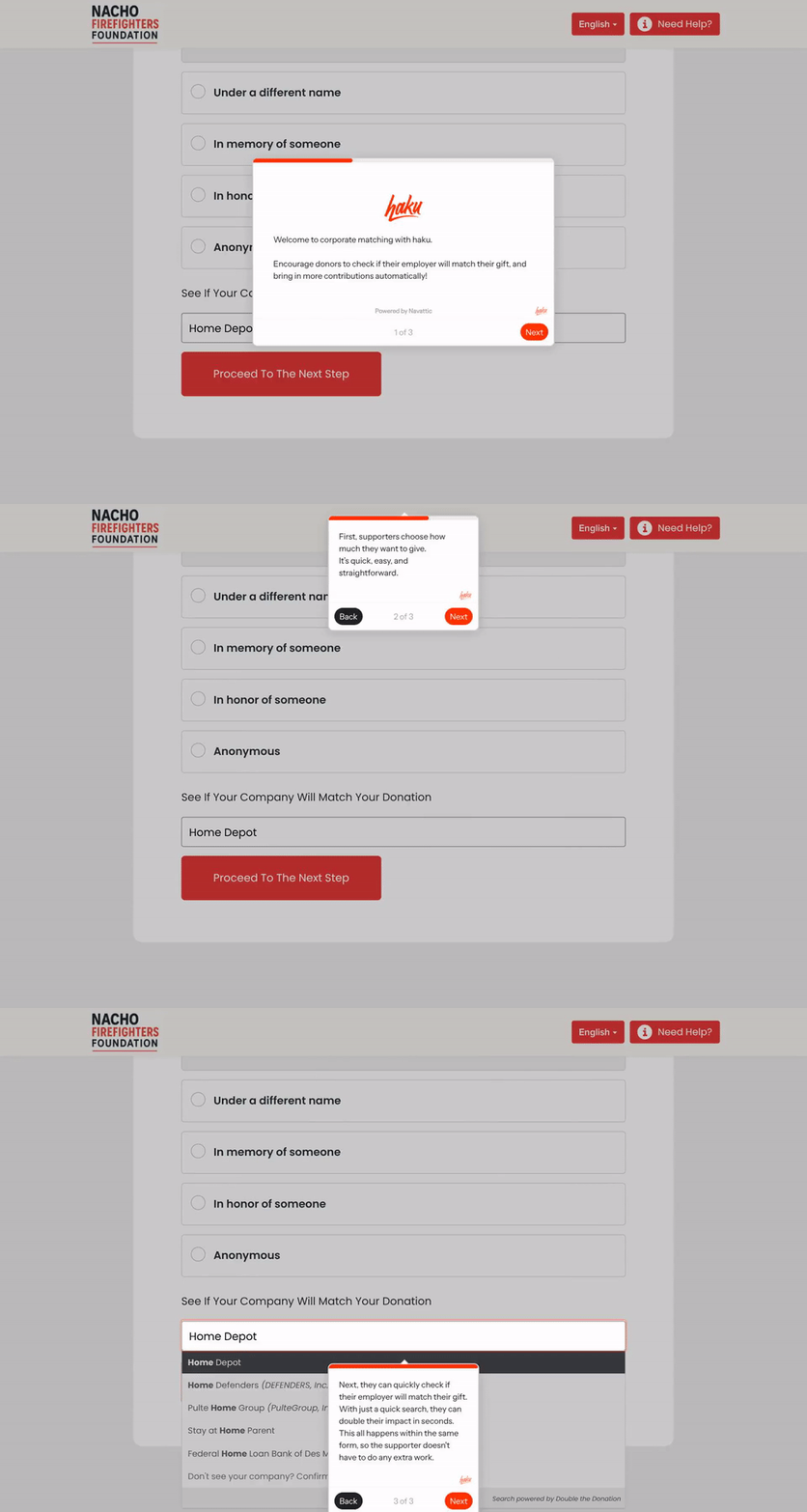
For your staff, the benefit is a cleaner process with better employer data. It lets your team send more consistent reminders, and manage fewer one-off follow-ups. For donors, the benefits are timing and convenience. They do not have to find a separate matching gift page later.
Build corporate matching into normal fundraising operations
A corporate matching program works best when it is part of the normal giving process, not an afterthought.
With haku and Double the Donation, nonprofits can bring corporate matching gifts into the donation process instead of sending donors to figure it out later. Donors get a clearer path to complete the match, and fundraising teams get a cleaner process to manage.
Are you ready to understand how haku can help optimize your donation forms and processes? Request a demo today.